Loading Table of Contents...
What you need to know when designing a website professionally
What you need to know when designing a website: goals, UX/UI, SEO, speed, security, technology, and effective long-term operations.
What you need to know when designing a website includes its goals, audience, content structure, UX/UI, responsive design, SEO, performance, security, technology, integrations, testing, and post-handover operations. Defining these factors early helps a business limit revision costs, protect its SEO performance, and build a stronger foundation for marketing and sales.
Join Connect Tech as we examine each factor below, including what to prepare, how to make the right choices, and which mistakes could increase costs after your website goes live.
1. Define what the website needs to achieve before designing it
A website creates value only when a business clearly defines which business goals it should support.
Which business goals will the website serve?
A business website may support branding, lead generation, sales, e-commerce, or information delivery, depending on the business model. A brand website needs to communicate positioning and credibility, while an e-commerce website should prioritize products, the cart, checkout, and the purchase journey.
A business should identify one primary goal before creating the sitemap and interface. A clear goal helps the design team choose the right page structure, calls to action (CTAs), content, and features.
Who will use the website?
The target audience determines how a website organizes content, navigation, and interactions. Before design begins, a business should identify its audience, pain points, search behavior, and the devices customers commonly use.
For example, B2B customers often need information about capabilities, case studies, processes, and contact forms, while e-commerce customers need product search, filters, reviews, prices, and a fast checkout.

2. Prepare content and website structure before designing the interface
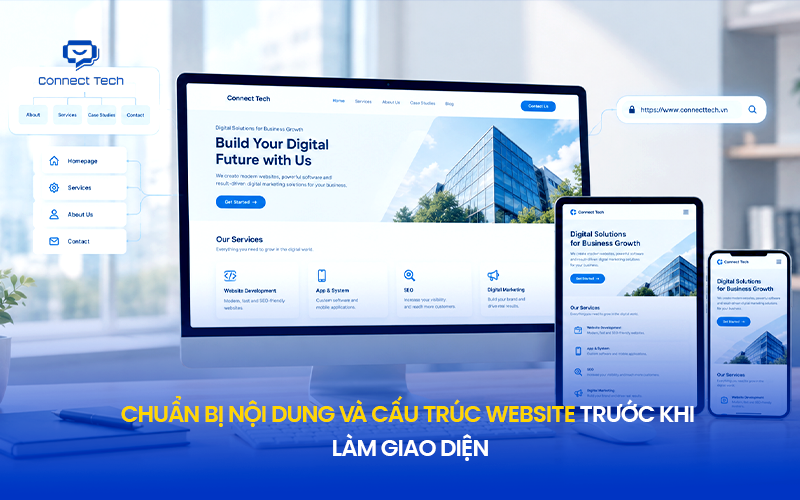
The website structure should be defined before the visual design so that the interface supports the content and user journey instead of functioning as a decorative layer.
Build a sitemap
A sitemap outlines the system of pages, while information architecture organizes content by relationship and priority. A business should define its main content groups, navigation levels, and paths between pages before building the UI.
A clear structure helps users find information faster and helps Google Search understand how the content relates.
Identify the pages and features you need
A website needs pages and features that fit its goals, rather than a copied list of competitors' features. A business website commonly needs a homepage, About page, Services pages, Case Studies, Blog, Contact page, Privacy Policy, and relevant landing pages.
An e-commerce website may also need product listings, product detail pages, a cart, checkout, customer accounts, order tracking, and a payment gateway.
Prepare content, images, and brand assets
Content determines how much information the UI must accommodate. Businesses should therefore prepare copy, images, logos, brand guidelines, videos, and product data as early as possible. Using real content in the prototype helps designers spot issues with text length, hierarchy, and layout before development.
Design the URL structure from the start
URLs should reflect the content structure and remain stable to support both users and search engines. Use short, understandable, consistent URLs instead of paths that rely on parameters or a structure with no clear meaning.
This is an important consideration when designing a website because changing URLs after a site has gained traffic and backlinks can create SEO risks.
3. Design UX/UI around user behavior
Effective UX/UI helps people complete tasks quickly, while visual design helps them understand which information matters most.
What problems should UX solve?
UX addresses obstacles users encounter while finding information, evaluating options, and taking action. Designers should map the user journey before deciding on layouts, components, and interactions.
Navigation and user flows
Navigation helps users understand where they are and where they can go next. Menus, breadcrumbs, internal links, search, and CTAs should form a coherent user flow rather than operate independently.
Typography, color, and visual hierarchy
Visual hierarchy helps users recognize important information before supporting details. Typography, white space, color, size, and contrast should work together to distinguish headings, body copy, CTAs, and secondary content.
A business should avoid reducing design decisions to a debate about blue versus red. Interface effectiveness depends on the entire visual system and the goals it serves.
CTAs and conversion points
A CTA should make the next available action clear. A button labeled “Get a quote,” “Book an appointment,” or “Buy now” is more useful than a generic CTA when it matches the user's intent at that point in the journey.

4. Ensure the website works well on mobile and other devices
Responsive design should preserve usability across screen sizes, rather than merely shrinking the desktop interface.
Responsive design is more than a smaller layout
A responsive website adjusts its layout, typography, navigation, images, and components to the viewport. A mobile-first approach helps the team prioritize essential content and actions when screen space is limited.
Optimize mobile navigation, buttons, and forms
Mobile navigation should be simple, buttons should be easy to tap, and forms should omit unnecessary fields. Businesses should check spacing between elements, font size, menus, pop-ups, and checkout on small screens.
Test the website on real devices
Testing on real devices can reveal issues that a desktop emulator does not fully capture. The QA team should test across browsers, operating systems, resolutions, and network conditions.

5. Build an SEO foundation during the design process
Technical SEO should be considered during architecture and development, rather than treated as a set of fixes after the website is complete.
Website structure
Google Search uses crawling and indexing to discover, process, and store website content. A website needs a clear internal linking structure, an appropriate sitemap.xml, a correctly configured robots.txt, and crawlable important pages.
URLs, headings, metadata, and internal links
Headings organize content, titles and meta descriptions describe pages, and internal links connect related topics. SEO-friendly site architecture should be developed alongside information architecture.
Images, semantic HTML, and structured data
Semantic HTML helps browsers and search engines understand the roles of page elements. Image optimization, alt text, and structured data can support content understanding and the search experience when used in the right context.
Protect existing SEO when redesigning a website
Before moving an existing website to a new structure, inventory its URLs, traffic, rankings, and backlinks. The team should map old URLs to new ones, use 301 redirects where needed, and check canonical tags, the sitemap, internal links, and indexing status after migration.
This is especially important to know before building a new website for a business that already receives substantial organic traffic.
6. Optimize performance instead of focusing only on appearance
A website needs to balance visual quality and performance so that users can access and interact with it quickly.
Which Core Web Vitals matter?
Core Web Vitals focus on key aspects of page loading and interaction. Metrics such as LCP, INP, and CLS help teams assess loading performance, responsiveness, and visual stability.
Images, video, JavaScript, and animation
Media and JavaScript can increase page weight if the development team does not manage asset sizes and loading behavior. Image compression, responsive images, lazy loading, and JavaScript optimization can reduce unnecessary load.
Hosting, caching, and CDNs
Hosting affects server response, caching reduces the need to process resources repeatedly, and a content delivery network (CDN) serves content from servers closer to users. These choices should reflect traffic, user locations, and system requirements.
Assess performance on real devices
Performance testing should use both measurement tools and real devices. Lighthouse, PageSpeed Insights, and real-user data can provide different views of performance.
7. Address accessibility, security, and privacy
Accessibility, security, and privacy help a website serve more users and reduce risks to data and operations.
Basic accessibility principles
Accessibility helps people use website content and features in different circumstances. Pay attention to contrast, alt text, heading hierarchy, keyboard navigation, form labels, and error states.
HTTPS, authentication, and access control
HTTPS protects data transmitted between the browser and server. Authentication and access control limit access to administrative areas. Websites with user accounts or sensitive data need appropriate identity verification and permissions.
Backups and data protection
Backups help a business restore its website after an error, data loss, or system incident. A backup policy should specify frequency, storage location, retention period, and the restoration process.
Privacy and cookie policies where needed
Websites that collect personal data or use cookies should determine their privacy obligations based on the markets and business model involved. Businesses should disclose necessary information and manage data according to an appropriate policy.
8. Choose a CMS and technology based on actual needs
A CMS and technology stack should meet operational, performance, and scalability requirements rather than follow whichever technology is currently popular.
When should you use a CMS?
A CMS suits businesses whose marketing or content teams need to update the website frequently. WordPress is a common option for websites that need flexible content management and a relatively quick launch.
When should you choose custom development?
Custom development fits websites with specific business logic, complex workflows, system integrations, or a need for deeper architectural control. Laravel may suit systems requiring a customized backend, while Next.js can support modern websites with demanding frontend performance and experience requirements.
9. Design for growth and long-term operations
A website should be treated as an operational platform connected to marketing, sales, and management, rather than a one-time deliverable.
Which systems should the website integrate with?
Depending on the business model, a website may connect with a CRM, ERP, payment gateway, shipping system, analytics platform, or APIs. Plan integration architecture early to avoid rebuilding the backend as the business grows.
Can your team manage the website independently?
The CMS and access permissions should match the internal team's capabilities. A business should know who can edit content, manage users, update products, and view analytics data.
Can the website scale as the business grows?
Scalability allows a website to keep meeting demand as traffic, products, users, or features increase. Its database architecture, hosting, APIs, caching, and codebase should be able to grow with the business roadmap.
10. Test the website before launch
Testing helps uncover functional, interface, SEO, performance, and tracking issues before the website serves real users.
Functional testing
Functional testing covers forms, search, login, cart, checkout, payments, email notifications, and other core features. Each important user flow needs a corresponding test case.
Responsive and browser testing
QA should check the interface in Chrome, Safari, Edge, and other relevant device environments. Focus on the devices the actual audience uses most.
SEO and indexing testing
SEO testing should cover status codes, canonical tags, robots.txt, sitemap.xml, titles, headings, internal links, and whether important URLs can be indexed.
Performance, accessibility, and security testing
Performance testing assesses speed and Core Web Vitals; accessibility testing checks whether people can use the site; and security testing looks for weaknesses that could affect data and systems.
Analytics and conversion tracking
Analytics should accurately record important business events. Google Analytics 4, Google Search Console, or another analytics system should be configured before launch so the business does not lose data from its first days of operation.
What you need to know when designing a website is how to turn business goals into a digital platform that is easy to use and find, fast, secure, and able to grow. Define goals first, plan architecture and content before UI, incorporate SEO and performance into development, choose technology based on actual needs, test before launch, and keep measuring after handover.
Contact Connect Tech for advice on a solution that fits your business needs and growth plans
Table of Contents
Related news

Interior website design services optimized for conversions
Connect Tech provides premium SEO-friendly interior website design with optimized UI/UX and page speed to improve customer conversion rates.

Professional cosmetics website design to grow revenue
SEO-friendly cosmetics website design with optimized UX/UI to own customer data, build trust, and grow revenue. Get expert advice today!

What you need to know when designing a website professionally
What you need to know when designing a website: goals, UX/UI, SEO, speed, security, technology, and effective long-term operations.

What is mobile friendly? How to test and optimize for SEO
Learn what mobile friendly means and how to use mobile friendly test tools. Discover how mobile-friendly web design can improve SEO and conversions.

Website design dimensions for optimal UX/UI across devices
A guide to standard website design dimensions for multiple screens. Use the right sizes to improve UX/UI, conversions, and smoother development.

Top tools to check website speed and optimize effectively
Learn how to check website speed with accurate tools, analyze what slows your site down, and optimize website load speed to increase conversions.