Loading Table of Contents...
What is a wireframe? Wireframe vs mockup explained
What is a wireframe? Learn the difference between wireframes and mockups and why structural sketches help businesses improve user experience.
What is a wireframe? It is a visual structural sketch that shows how content is arranged and how users are expected to move through a website or application. This article explains the concept, clarifies the differences between key design stages, and shows why each stage matters. Understanding these principles helps businesses control the development process more effectively, improve customer experience, and avoid unnecessary revision costs later.
Overview of wireframes in design
A wireframe is a static diagram that represents the two-dimensional layout of a website or application. Designers use it to define the position of interface elements, navigation structure, and basic information flow. The wireframing process removes visual distractions such as colors, decorative typography, and real images so that stakeholders can focus on structural logic.
When exploring digital platform development in more detail, users often ask what a website wireframe is and what role it plays. Essentially, it is the core framework that outlines how a website will function. It determines where customers will see the logo, search bar, text content, and call-to-action buttons.
Some technical resources also refer to spatial structures, which relates to the term wireframe model. This term describes a spatial framework made up of lines and intersection points that form three-dimensional shapes to visually simulate objects or elements on a screen.
The easiest way to understand the concept is to compare it with architecture.
Just as an architect needs a technical floor plan to determine the position of rooms and pathways before choosing wall colors or furniture, a digital wireframe acts as the technical blueprint of a digital product, ensuring that your digital “building” has a strong structure before visual styling is added.
From a conversion optimization perspective, a professional wireframe should address three key areas:
- Information architecture: Content blocks need to be organized logically so users can understand the brand’s business message easily.
- User flow: The customer journey from entering the page to making a purchase or submitting information should be smooth and free from unnecessary obstacles.
- Usability: Navigation bars, forms, and buttons should be positioned to maximize convenience across both desktop and mobile interfaces.

The difference between wireframe, mockup, and prototype
Clearly distinguishing the different stages of the design process helps business owners and project teams collaborate more efficiently and reduce approval time.
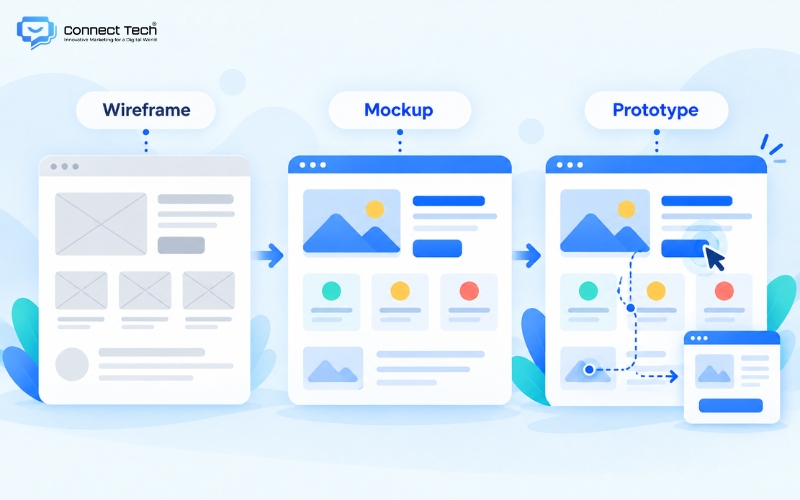
Many businesses and non-technical staff become confused by industry terminology when working with agencies. This confusion often leads to mixed or inaccurate search queries, such as what is wireframe mockup, when users have not yet clearly distinguished between a rough structural sketch and a static visual design with full colors.
The three concepts - wireframe, mockup, and prototype - can be compared to better understand how a digital interface is developed.
|
|
|
|
|
|
|
|
|
|
|
|
|
|
|
|
|
|
|
|
From a technology specialist’s perspective, businesses should approve designs in the correct order, from rough structure to detailed interface. During the structural approval stage, marketing teams and business owners should focus only on whether customers can find product information easily. They should not evaluate colors or fonts at this stage.
Changing a user flow or moving an information block in a rough wireframe usually takes little time. However, if structural changes are requested after the mockup or prototype has already been approved, the project team may need to redo significant portions of the work. This disruption wastes resources, delays the product launch, and can create unnecessary additional costs. For this reason, understanding the definition and purpose of each design stage is essential for effective technology project management.
Common types of wireframes
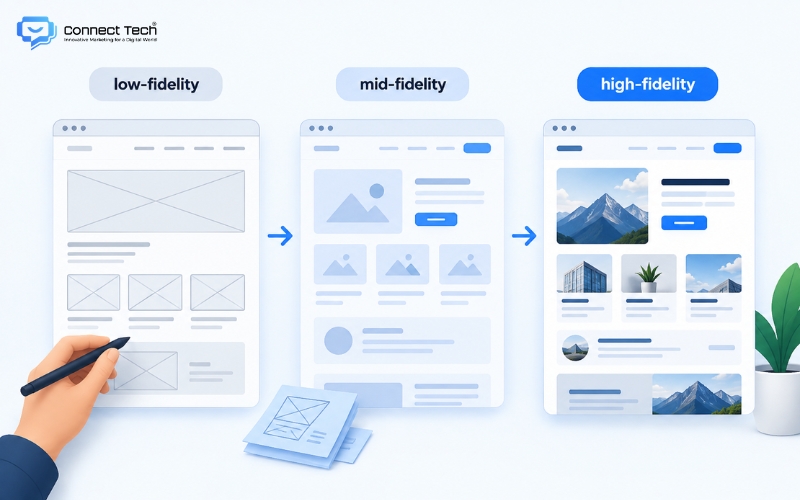
UI/UX professionals generally classify wireframes into three categories based on their level of detail, also known as fidelity. Each format serves a different purpose in user behavior research throughout the lifecycle of a digital project. Using different wireframe levels flexibly helps both the design team and the client optimize time and resources.
Low-fidelity wireframe
Designers often sketch this format quickly on paper or a whiteboard to capture initial ideas. The draft includes only basic geometric shapes used to roughly define areas for content or images.
Mid-fidelity wireframe
Technical teams use specialized tools to turn initial ideas into a more structured digital layout. Interface elements such as spacing, text size, and graphic areas are aligned using realistic proportions, while placeholder text such as lorem ipsum is used to fill the content space. This is the format most commonly used by agencies when presenting concepts to clients because it accurately reflects user interaction flows.
High-fidelity wireframe
This format is close to the level of detail of a real interface while still typically using a grayscale visual style. Design professionals use high-fidelity wireframes for systems with more complex ecosystems. This level requires pixel-perfect spacing and a clearly defined information hierarchy before the project moves into the visual branding and color stage.
For SMEs working with digital development partners, it is often useful to review projects using mid-fidelity wireframes. This level gives business owners a complete view of the information structure without allowing visual elements to distract from the main purpose. It enables both sides to focus on solving business problems and improving conversion rates.
Why wireframes are an essential step in website development
The digital framework stage shapes both the future scalability of the system and the business performance of the website.
Creating a structural diagram early helps all departments align around the same strategic vision. The marketing team understands how content should flow, while developers can identify the core functions that need to be built. This alignment prevents major rework once the project reaches the more complex coding stage.
From a conversion rate optimization perspective, a well-structured layout brings significant value to the brand’s sales funnel. Information blocks can be arranged according to natural reading behavior to guide users through each stage of awareness. Placing the right call-to-action button at the point where customers develop purchase intent can significantly increase the number of leads.
Business owners can also evaluate the logic of the customer journey more easily by reviewing a clear black-and-white structure instead of being influenced by an attractive visual design that may lack practical value.
In addition, planning the information system carefully from the beginning creates a strong foundation for search engine optimization. A clear page structure helps search engine crawlers understand the main topic of the website more efficiently.
Logical content hierarchy also creates a smoother user experience, encourages visitors to stay on the page longer, and helps reduce bounce rates. Investing seriously in the structural design stage is therefore one way to build a sustainable platform that can satisfy both user needs and search engine requirements.

What are the basic steps to create a website wireframe?
Understanding a standard wireframing process helps managers see how a business idea is transformed into an actual technology platform. When starting a user interface project, people without a design background often wonder what wireframe design is within the overall development process. In practice, it is the process of arranging functional components logically in order to guide customer behavior.
From a management perspective, business owners working with agencies also often ask how to create a wireframe and what the process looks like in practice. The concept simply refers to using sketching tools to visualize the full information flow before system development begins.
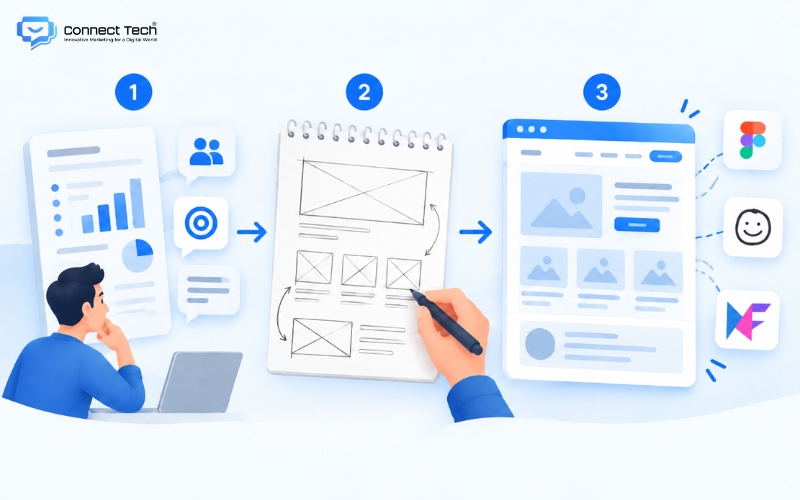
A standard wireframe process usually includes three core stages:
- Research business requirements: System analysts collect project objectives and identify the target customer profile. This provides the foundation for determining the number of pages and the content hierarchy.
- Create an initial sketch: The design team uses pen and paper to quickly outline the main functional blocks. This manual method speeds up ideation and helps eliminate ineffective ideas early.
- Move the design into specialized software: Interface designers digitize the hand-drawn sketch into a complete structure. They adjust spacing, establish a grid system, and define accurate layout proportions.
The current technology market provides many tools that support the wireframing process.
- Figma: UI/UX professionals often prefer this platform because it provides strong real-time collaboration capabilities.
- Balsamiq: Provides a hand-drawn visual style that works well for fast brainstorming sessions.
- MockFlow: Another popular option that allows non-technical users to assemble interface layouts from ready-made components easily.
Important considerations when approving a website structure
During project approval, clients often focus too heavily on complex visual details at the earliest stage. This misunderstanding wastes time and shifts attention away from the main purpose of a wireframe: evaluating information flow. At this stage, the primary focus should be on whether the arrangement of content blocks is logical.
Another common mistake is overlooking the mobile experience. B2B customers often review interfaces on large desktop screens, which can result in designs that are less suitable for mobile devices. In practice, a large share of website traffic now comes from handheld devices. Businesses should therefore ask development partners to provide and carefully review the structure for vertical mobile screens to reduce the risk of high bounce rates.
Professional technology providers always prioritize solving the business problem before focusing on visual decoration. A logical structure guides customer behavior naturally and addresses key bottlenecks throughout the sales funnel.

In summary, understanding what a wireframe is helps businesses take greater control over project quality and build a strong digital foundation. A well-designed structural diagram not only improves user experience but can also significantly support conversion performance for the brand.
Connect Tech provides custom website design solutions that combine technology, SEO, and Digital Marketing so websites can grow alongside the business. Contact Connect Tech for advice on a solution that fits your business model and objectives.
Connect Tech - Web Design Agency
Innovative Marketing for a Digital World
Hotline: 077 317 5996
Email: info@connecttech.vn
Table of Contents
Related news
What is visual design? A foundation for better conversions
What is visual design? Learn the role of a visual designer and design and visualization fundamentals for better UX/UI and website conversions.

Standard website banner sizes for every screen
Learn standard website banner sizes for every device, plus safe zone rules, image optimization tips, and a technical SEO checklist.

Website header: Design standards for better UX and SEO
What is a website header? Explore its structure, standard dimensions, and design examples that improve UX, conversions, and customer retention.

What is a website footer? Structure and standard examples
What is a website footer? Learn its role and design principles, plus beautiful website footer UI examples and templates for better user experience.

Top 15 web design fonts for SEO and better UX/UI
Explore the best web design fonts for 2026. Learn how to choose commonly used fonts that improve UX/UI and support Vietnamese characters correctly.

What is a wireframe? Wireframe vs mockup explained
What is a wireframe? Learn the difference between wireframes and mockups and why structural sketches help businesses improve user experience.